And here comes version 9.1 (currently at phase 9.1.3), a version that is by no means revolutionary, but one that makes the software more stable and introduces some nice little refinements. As usual, the program includes bug fixes, improvements, and a few new features. Let’s start with the fixes. Numerous minor corrections have been made that I won’t go into detail about, as they often concern things that go unnoticed. But let’s take a look at the more noteworthy ones:
- On the first page, where you enter the chart information, I have swapped the positions of the “default city” and “categorization” buttons in response to user feedback.
- In the User Guide 📔, section navigation was no longer working. This has been fixed.
- In the Tracker (long press on 🎉), loading transits alone was no longer working either. This has been fixed. In addition, the Tracker dates will now automatically match those loaded in levels 2/3, rather than necessarily using the current dates. The font size of the dates has also been reduced to fit better inside the boxes. And last but certainly not least: the analysis step intervals for the Moon, MC, and AS have been considerably reduced to ensure that aspects formed by these rapidly moving points are no longer missed by the Tracker.
- In the Notes panel ❝, when adding a date, it was not possible to change the date and time of level 1. This has been fixed.
- The chart-saving system used when adding events in the Dates tab has also been strengthened to prevent dates belonging to one chart from ending up in another chart (which could happen when several tabs were open).
- In the Dates panel, as well as in the Notes and Grimoire panels, the scrollbar will now always remain visible. Some users with mice that do not have a scroll wheel reported difficulties scrolling when the scrollbar was hidden.
- On the chart wheel, the size of the degree values displayed next to the planets used to change along with the size of the planetary symbols. They are now completely independent and have their own size setting in the configuration panel.
- When a zodiac sign was added to the wheel as “non-detectable”, sensitive points containing that sign would no longer appear. This has been fixed. Furthermore, each time a zodiac sign is activated, it is now detectable by default. I have also made a small code correction to prevent certain “persistence” effects when a point switches from detectable to non-detectable, and vice versa.
- Customizable points could not be right-clicked to open the context menu displaying the list of midpoints, as is possible with other celestial bodies. This has been fixed.
- The cusps displayed by clicking the arc-shaped button suffered from an incorrect wheel rotation when clicked while “Cusp” mode was enabled. This has now been fixed, and the wheel correctly rotates so that 0º points to cusp nº10.
- When levels had been rotated/shifted using the Horoscope panel (long press on 🏠), the zodiac sign displayed next to the longitude on harmonic wheels was sometimes incorrect.
- Still regarding rotations/shifts, hovering over a custom point would display a tooltip showing only its original longitude rather than its shifted longitude. The tooltip will now display the latter.
- In the midpoint and sensitive point calculation panel, I have corrected the addition and subtraction calculations, which sometimes failed because the Vernal Point was not always calculated correctly. A warning now alerts users to potentially conflicting situations when it is included in level 2 (since its position changes depending on the direction method being used). Also, in the same panel, it is now possible to change the second planet without automatically disabling the third one. A real time-saver!
- A major correction has been made to the MC and AS analysis script used for relocation, so that it now takes the local time regulations into account in real time. This may potentially slow down older computers slightly, but it is necessary to ensure that relocations are not distorted by special time-zone or daylight-saving rules.
- The screenshot button has also been fixed and refined so that it captures only the actual contents of the chart and its text. Previously, it sometimes left white borders or cropped the longitude values displayed next to the planetary symbols.
Next, some improvements:
- In the folder where charts are saved, a ✏️ button now allows you to edit a chart’s name.
- Free Composition mode (long press on 🔭) has now been corrected to accommodate Jyotish.
- The tabs that appear at the top of the screen when several charts are open can now be rearranged by dragging and dropping them.
- The visual guide showing the lines of angles and cusps is now displayed behind the planetary symbols for greater clarity.
- In the listings, tooltips have been added when hovering over the buttons at the bottom of the screen, since their functions were not always obvious, particularly the long press on the heart 🫀 to access anatomical correspondences.
- And on that subject, I have added an option to reverse the order of the zodiac signs in the list, in accordance with Witte’s view of sign inversion (♈︎ as the 7th sign, ♎︎ as the 1st sign). Also, clicking on a degree now rotates the wheel directly to that position.
- The context menu that appears when right-clicking on the chart wheel now includes all direction and progression options.
- The calculator tool is also available directly from this same menu. Incidentally, the calculator has been improved so that it recognizes the / symbol as an instruction to calculate the midpoint between the planet preceding it and the planet following it. A second result field has also been added, displaying both the “absolute” result and the result expressed as modulo 30 + zodiac sign. Finally, the display of planets in the list opened by clicking the planet-shaped button has been redesigned for greater simplicity.
- This same display format has also been applied to the planets shown in the search window of the Distances panel (single click on the scale-shaped button).
- The tooltips that appear when hovering over a planet have been modified to show its position (longitude) more clearly, while also including its position within the House of the system being analyzed (in Cusp mode). The entire layout has also been standardized. Furthermore, this information is now available in the MPFP panel, which opens when you long-press a planet, by clicking the ⓘ at the top of the page, next to the planetary symbol.
- In the Notes panel ❝, the tabs have been reorganized to place the Dates tab first, since it is the most frequently used. Also, within this tab, clicking the calendar 📆 or planet 🪐 button enables or disables the automatic loading of the date and time (📆) or the configuration (🪐) saved with the corresponding event. The application remembers the state of these buttons.
- In the Houses table 🏠, the table generator for planetary positions in signs and Houses now allows several house systems to be selected simultaneously.
- In the rulership settings, all planets, including the Sun and Moon, can now become rulers. Only immaterial points, such as the Nodes, MC and AS, Vertex, and Black Moon, cannot be assigned rulership.
- When loading a Solar Return ☀️, an information line now indicates the “age” associated with that return.
- In the Graphic Ephemeris 📊, on computers only, clicking a date point on a curve now automatically loads that date into the transit date selectors.
- In the configuration panel, the MC/IC, AS/DS, and NN/SN buttons have been separated for easier use.
- Finally, in the configuration panel, a long press on certain points allows alternative symbols to be displayed. This applies to the MC, IC, AS, DC, Capricorn, Uranus, Neptune, and Pluto.
And now, a few new features:
- First of all, every month, the application will offer to create a complete backup (settings, charts, etc.). This reminder can be disabled in the configuration panel using a new button added at the very top, shaped like a four-leaf clover (those who have ever experienced the unpleasant surprise of losing all their data, only to accidentally stumble upon a backup on their computer, will understand the significance of this clover…).
- Still within the configuration panel, it is now possible to adjust the wheel’s rotation speed, or even set it to 0 for instantaneous movement (some people are always in a hurry!).
- Also in the configuration panel, a long press on the Sun button reveals the Earth button, positioned opposite the Sun.
- Another new option in the CALCULATIONS section of the configuration panel allows you to calculate the Moon’s position topocentrically.
- Speaking of the Moon, calculations for Lunar Synodic Returns and Lunar Profections have been added, in accordance with Witte’s articles 14 and 15 (I’ll come back to these later). On computers, you can also right-click the Moon-shaped Lunar Return button to choose whether to display Lunar Synodic Returns instead.
- Two additional methods for calculating the Personal Meridian have been added: “Sidereal Constant” and “Ecliptic”. You can select these options in the configuration panel, although I recommend using the “Simplified” version, which produces better results and is the method Witte used by default for most of his calculations.
- In the date and time selectors, a padlock-shaped button now appears for level 1, allowing you to lock or unlock changes to its date and time, thereby preventing accidental modifications. In addition, a long press on the alarm-clock button for levels 2/3 now loads the date and time from level 1 into them.
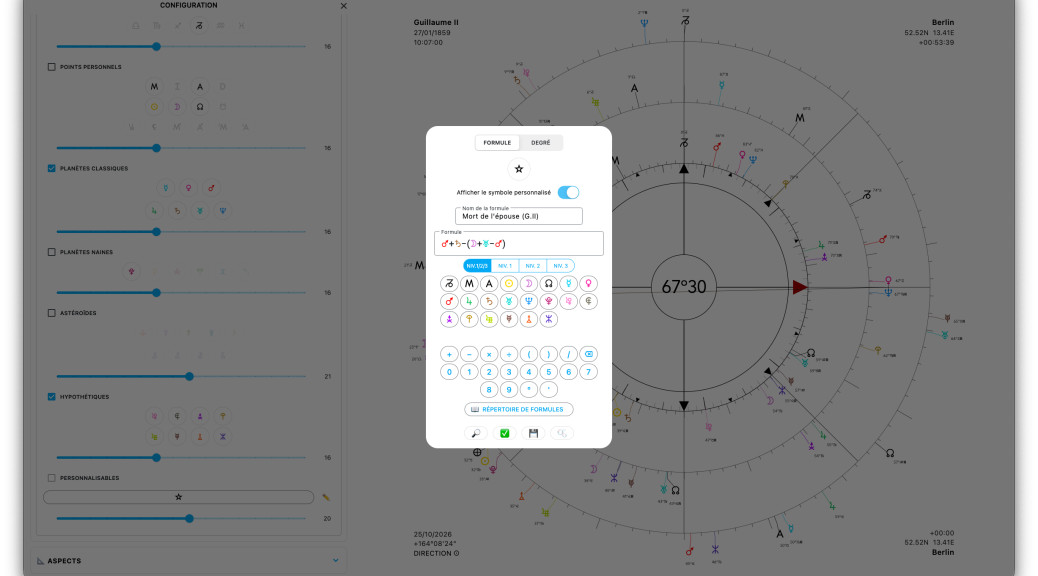
- A major overhaul of “customizable” points has also been carried out in the configuration panel. There is now a single section allowing you to generate as many buttons as you wish (so there is no longer any limit). You can create complex formulas by adding numerous factors in succession. You can also add a formula directly from the search engine, change the level of individual factors by highlighting them and adjusting the slider, and save formulas under custom names in a dedicated directory so you can retrieve them later.
- In the Distances panel (single click on the scale-shaped button), it is now possible to display “double distances”.
- In the Declinations panel 📏, only the declinations of the levels currently displayed on the chart will now be shown. In addition, a second tab called INFORMATION has been introduced, providing further astronomical information, including the famous intersection point with the ecliptic corresponding to the planet’s position along its hour circle, or celestial meridian, which Witte discusses in his article “Forensic Contribution — Determination of the Birth Meridian”.
And speaking of Witte, I have a major announcement!
After many years of work, reading, rewriting, translating, correcting, and annotating, I am delighted and immensely proud to announce that, for the very first time, the complete writings of Witte, the foundational texts of the Hamburg School’s astrological technique, are now available in French!
I have spent an enormous amount of time reworking these texts, which contained a truly staggering number of errors, ranging from simple syntactic mistakes to symbols incorrectly reproduced by the typesetter, and even cases where “Witte got the time wrong by an hour because he forgot to account for the time-zone offset”. And all of this was written in some frightfully telegraphic German, much to my delight!
FIND ALL THE INFORMATION ABOUT THIS COURSE HERE (only in French).